HttpContext context = System.Web.HttpContext.Current;
for (int i = 0; i < context.Session.Contents.Count; i++)
  {
    Response.Write(Session.Contents[i].ToString() + "<br />");
  }
2014年6月13日 星期五
ASP.NET 取得目前所有 Session 清單

2014年6月11日 星期三
Visual Studio 2012 安裝錯誤 Microsoft Web Deploy 3.0 與目前的系統時鐘或簽署檔案的時間戳記核對時...
Visual Stuido 2012 安裝完成後出現如圖錯誤

此錯誤會造成新增 ASP.NET 專案時,發生下面錯誤

解決方式:
此錯誤會造成新增 ASP.NET 專案時,發生下面錯誤
解決方式:
- 從http://www.microsoft.com/visualstudio/downloads#d-的其他軟體安裝最新的 Visual Studio 更新.
- 安裝 Web 部署 3.0 從http://www.iis.net/downloads/microsoft/web-deploy.
- 安裝NuGet http://www.nuget.org/
2014年5月28日 星期三
jQuery 取得 iframe 父層元素
//取最同一層元素
$('#flow')[0].innerHTML = "contents";
//取得上一層元素 (window通常可省略,e.g., window.parent.document)
$('#flow', parent.document)[0].innerHTML = "contents";
//取得最上層元素
$('#flow', top.document)[0].innerHTML = "contents";
IIS 根目錄網站與虛擬目錄網站 Web.config 影響
取消子網站繼承根目錄網站的設定即可
<location path="." inheritInChildApplications="false">
      <system.web>
         ...
      </system.web>
</location>
2014年5月22日 星期四
ASP.NET MVC 壓縮CSS與JavaScript
BundleConfig.cs
 修改後

bundles.Add(new ScriptBundle("~/bundles/extjs").Include(
   "~/Scripts/extjs/ext-all-debug.js",
   "~/Scripts/default.js",
   "~/Scripts/jquery-1.7.1.js",
   "~/Scripts/extjs/ext-lang-zh_TW.js",
   "~/Scripts/TRAUtility.js"));
Web.config
<compilation debug="false" targetframework="4.5">使用方式
@{
    Layout = null;
}
<html lang="zh-tw">
<head id="Head1" runat="server">
    <title></title>
    @Scripts.Render("~/bundles/extjs")
</head>
<body>
</body>
</html>
修改前2014年5月20日 星期二

2014年5月14日 星期三
設定本地端 IE 版本 X-UA-Compatible
本地端 IE 載入預設為IE7

查看回應標頭為 X-Powered-By: ASP.NET

設定IIS HTTP標頭為 X-UA-Compatible: IE=EmulateIE9
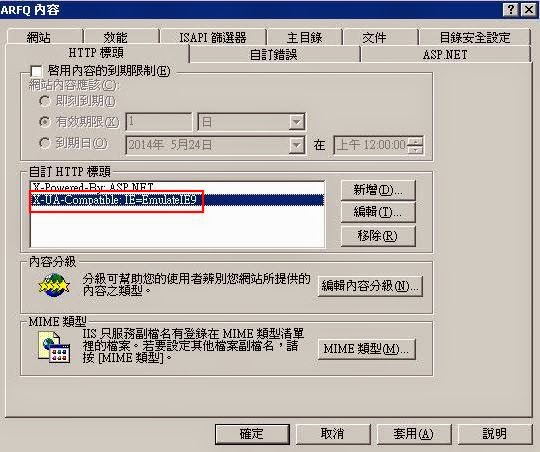
本地端 IE 版本則會依照 IIS 設定其瀏覽器相容性版本


訂閱:
文章 (Atom)